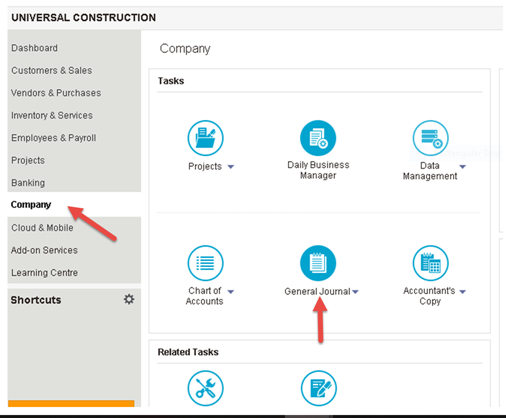
Once you have created your General Ledger report here is how to post it in Sage Desktop:
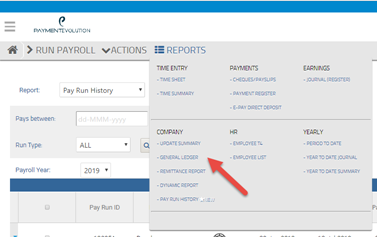
- Grab your GL report in VIEW or PDF format on REPORTS>GENERAL LEDGER in PaymentEvolution

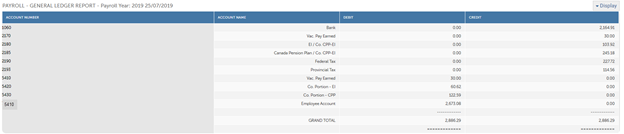
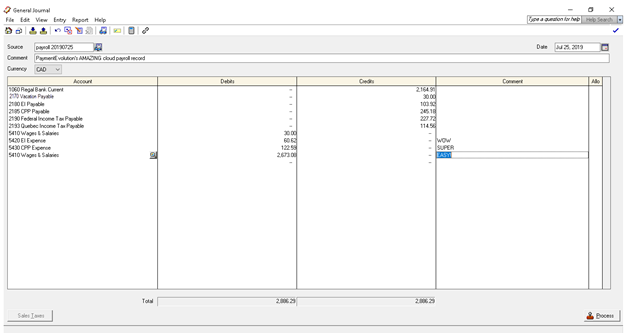
- Post your debits and credits exactly as they are in your General Ledger report
- Hint: if you are using direct deposit post the Bank line as a CR to your bank. If you are paying employees by Cheque post to a payroll clearing liability account instead to clear cheques through as they are cashed
-
Click Process and you are all set! Sit back and relax. If you use PaymentEvolution ePay services, employees are paid automatically and remittances are sent to the CRA and MRQ on time.
- Hint: if you are using direct deposit post the Bank line as a CR to your bank. If you are paying employees by Cheque post to a payroll clearing liability account instead to clear cheques through as they are cashed
Comments
0 comments
Article is closed for comments.