BC EHT is replacing the MSP which has been eliminated as of Jan 1, 2020. To find out more about BC EHT please see HERE
Activate BC EHT in your account:
Go to SETTINGS>PAY RULES>COMPANY RULES
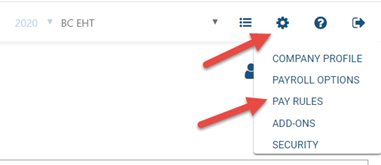
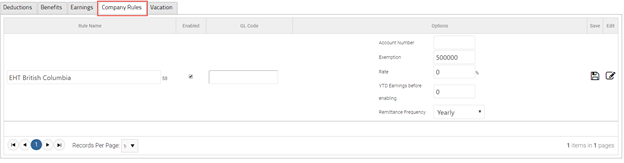
- Enable BC EHT and set GL Code (to track in your accounting software)
- Click Edit and enter:
- Account number (for BC EHT)
- Exemption (per year)
- Rate
- Previous YTD Earnings**
- Remittance Frequency
- Click Save
Example: If you are a registered business with BC remuneration between 500k and 1.5 million set your exemption to 500K and your rate to 2.925% (for 2020)
*see above link for your rate and exemption depending on your organization type.
**If you are just starting with PaymentEvolution and have already completed some payruns this calendar year that would affect your BC EHT please enter your taxable income to date in this field.
Remitting BC EHT
You will need to file your remittance with BC EHT, but getting your numbers is simple: Go to ACTIONS> EHT REMITTANCE REPORT

Go HERE to find out more about remitting your BC EHT
Here's to a happy and healthy workplace!
Comments
0 comments
Please sign in to leave a comment.