We offer a number of methods to fund your employee payroll. Each option has its advantages and you can select the one that best fits your business and how you run payroll.
Pre-authorized debit
Our most popular option is 'pre-authorized debit'. With this method, we automatically debit your company / source bank account for your payroll obligations and then make payments on your behalf to your staff and vendors. Pay runs using this option must be completed 4 business days in advance of the payment date.
**NOTE clients using ATB, or in the Cannabis industry, who fund their payroll via pre-authorized debit must complete their pay runs 5 business days in advance of the payment date.
You can setup pre-authorized debit using our guide: http://help.paymentevolution.com/entries/22126551-setup-epay-direct-deposit
Once setup, we'll update your payments profile and enter the details of your source bank account:

Need to Change Bank Accounts?
No Problem, just go to SETTINGS>COMPANY PROFILE>PAYMENTS PROFILE and click to +Add
Need to Change Max Amount?
Go to SETTINGS>COMPANY PROFILE>PAYMENTS PROFILE and click Download PAD. Please modify the max amount, initial it and send it to us via the upload options here: https://help.paymentevolution.com/hc/en-us/articles/360000571103-Q-How-do-I-securely-send-my-ePay-application-or-other-files-
*Some older accounts may not have a download option. If you need a copy of the PAD, please email support@paymentevolution.com and we can provide you with one.
Bill payment
If you have bill payment features in your online business banking service, you can send us the funds for your pay run. You'll need to fund your pay run at least 2 business days prior to the payment date by 3:30 EST.
Bill Payment is active on all accounts with ePay
Your reference number for your payment will show at the bottom of the page. You must use this number to ensure payment can be recognized and applied in a timely manner when you set up your bank account. You can also set this to be your default payment type. Additional fee applies for this service. Bill payment is available through almost every bank in Canada.

Bill payment via Bank of Montreal - add PaymentEvolution Corporation as the payee in your online banking profile as shown below:

Bill payment via CIBC - add PaymentEvolution Corporation as the payee in your online banking profile as shown below:

Bill payment via Tangerine - add Payment Evolution Corporation as a payee

Bill payment via ALL other banks- add PaymentEvolution (Corp)as a payee
Wire transfers
If you do not have 'bill payment' facilities or need to send us funds from international banks, you can use our wire payment option. With this method you should fund your payroll at least 2 business days in advance of the payment date. Wire is available on all accounts with ePay. You can also set this to be your default payment type. Additional fee applies for this service.

Using Wire/Bill Payment in the Payrun
Within your pay run on the Payments Tab please select Wire/Bill Payment on the source account and then take note of the amount, funding type and payment date on the Authorization step. 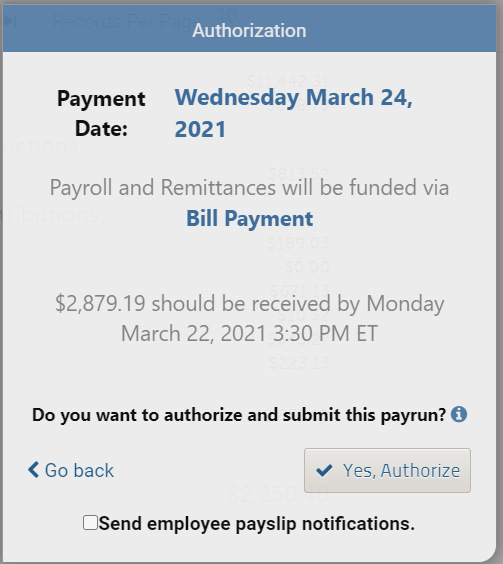
You MUST send the funds using your selected method (Wire/Bill Payment) so that it is recieved 2 business days before your employee payment date.
*If you need any help wth your account number for Bill Payment or Wire instructions please Contact Us at support@paymentevolution.com and we are happy to help.
Comments
0 comments
Article is closed for comments.