Manual Payrun (feature)

Manual Payrun feature
Please note that this feature is available as an option to accounts with our accountant / bookkeeper partners
The manual payrun feature is useful to post correcting entries to your payroll account. It functions like a manual journal entry in your accounting system - no payroll calculations are performed, just the entries you input are posted.
- Start a payrun. You will see a new option under payroll type called "manual"
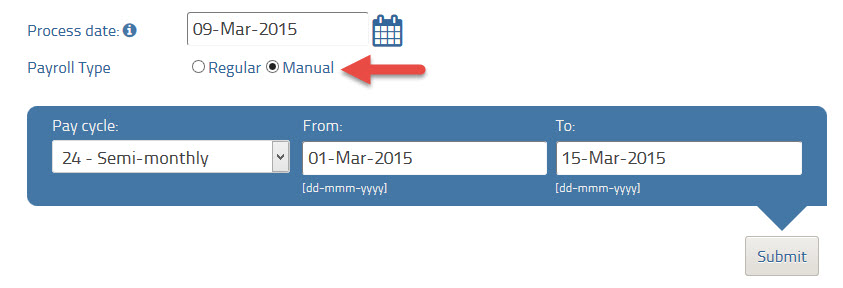
- Submit and you'll see a list of your employees. Select the one you wish to post manual entries for.

**NOTE- the system will pull the employee's default hours/pay. If you need to undo a specific payrun please get the employee's payslip from that payrun and enter negative amounts for each item as they appear on the payslip.
- You can now edit any field and enter manual amounts. For example, you can adjust the Regular Earnings, EI, CPP or any other field to reflect the changes you wish to make. Note: NO calculations will be performed - be sure to enter the data exactly as you need.

- Continue the payrun as usual to post the entries.
Important notes:
- This feature is only available to accounts registered with our accountant / bookkeeper partners. Please send a note to our support team if you need this activated for your clients.
- No payroll or other calculations are made using the manual entries using this feature
Post is closed for comments.
Comments
0 comments