If you've accidentally terminated an employee before processing their final payrun, or if you need an ROE for some purpose OTHER THAN CLAIMING EI here's how:
. Here's how:
- Log into your Payroll account and navigate to the EMPLOYEES area. To see the list of terminated employees, click on the terminated link.

- You'll see a list of terminated employees, click on the rehire icon beside the employee you wish to reinstate

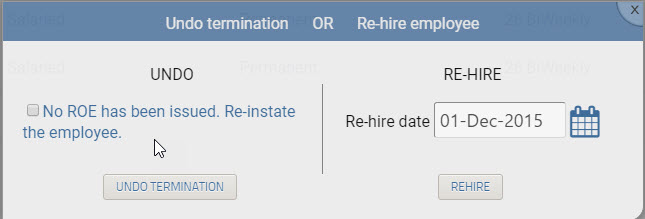
- You'll be prompted to UNDO or RE-HIRE - if you've accidentally terminated the employee, verify that you have NOT issued a record of employment and click UNDO TERMINATION.
- You can now process payroll as usual for that employee.
Notice
If you have already issued a Record of Employment for this employee, you should RE-HIRE the employee instead. This will clear the EI history and set their re-hire date accordingly.
Comments
0 comments
Article is closed for comments.