Import timesheets via CSV

How do I import timesheets or custom payroll data into Payroll using CSV?
-
Official comment

Updated April 17, 2014
Importing timesheets via CSV
You can import time records from third party systems via comma or tab separated value files (CSV files). Contact us to turn on CSV import for your account (it's part of our Business Pro plan). Once activated, you'll see a new payroll step called 'import'. Here you'll be able to upload a CSV file containing your payroll data. The data can contain entries for both salaried and time-based staff.
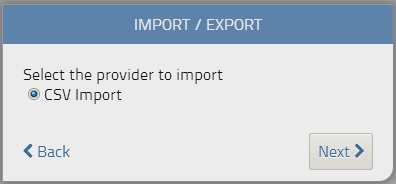
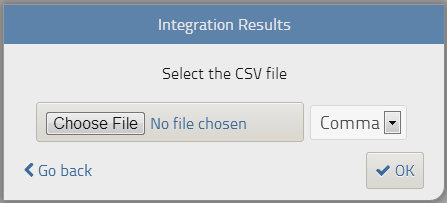
The file should be located on your local system and should be comma or tab separated.
Once you've uploaded your file, the system will parse your data and present you with the details of the import. You can select the entries you wish to import. You'll also have the option to automatically 'approve' these selected entries.
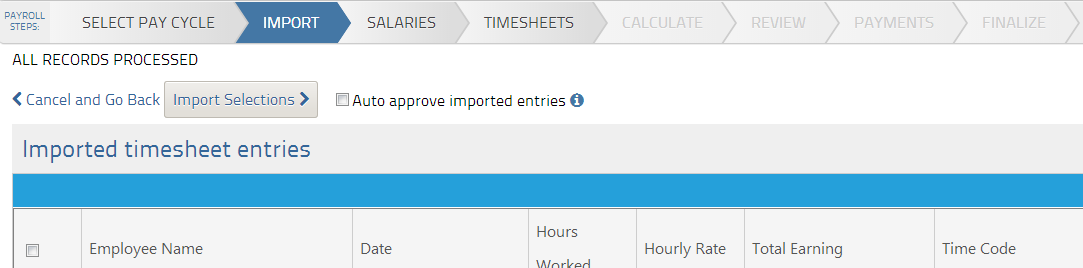
Once you've selected and imported your entries, these will be visible on the 'salaried' or 'timesheets' step of the payrun process. You can now proceed with finishing your payrun.
File specifications
The file you are importing should follow the format below:
Name
Field size
Description
Mandatory?
1
Shift
1
Shift code
N
2
EmployeeID
6
Numeric characters (filled with left 0s), 000000
Y
3
TimeCode
2
Characters for type of income:
R = Regular Hours
O = Overtime Hours @ 1.5
D = Doubletime Hours @ 2
X = Other Hours Worked
10 = Commission
11 = Statutory Holiday
12 = Sick day
13 = Personal day
14 = Shift Premium
15 = Earnings Advances
16 = Other Earnings
17 = Taxable Vacation Pay
18 = Other Non Taxable
VP = Release Vac Pay
MP = Manual PayY
4
CostAccount
10
Employee GL Cost Account
N
5
TotalHours
Total hours - Numeric type
N
6
HourRate
Hourly rate - Numeric type
N
7
Total
Total Amount to be paid.
If field 5 and 6 have values, it
should be the multiplication of
them.
Numeric type, (No $, example: 34000.02)Y
8
WorkDate
10
Start Date format dd/mm/yyyy
Y
9
WorkDateEnd
10
End Date format dd/mm/yyyy
N
10
TimeIn
8
Time in 24 hour format e.g. 0900
N
11
TimeOut
8
Time out 24 hour format e.g. 1700
N
12
Authorized
1
Is the record approved? N = not approved, Y = approved
Y
Download a sample CSV file
Comment actions
Post is closed for comments.
Comments
1 comment