Release and pay out vacation balances

How to release accrued vacation for an employee
You can release both partial and full vacation pay accrued in the system. First ensure that your employee is set up for automatic vacation pay (accrual). You can release vacation pay using the following method:
- Start your payrun as usual and click the "add other" earnings button beside the employee name you wish to release vacation for. In the drop down list, select "Release Vacation Owing"
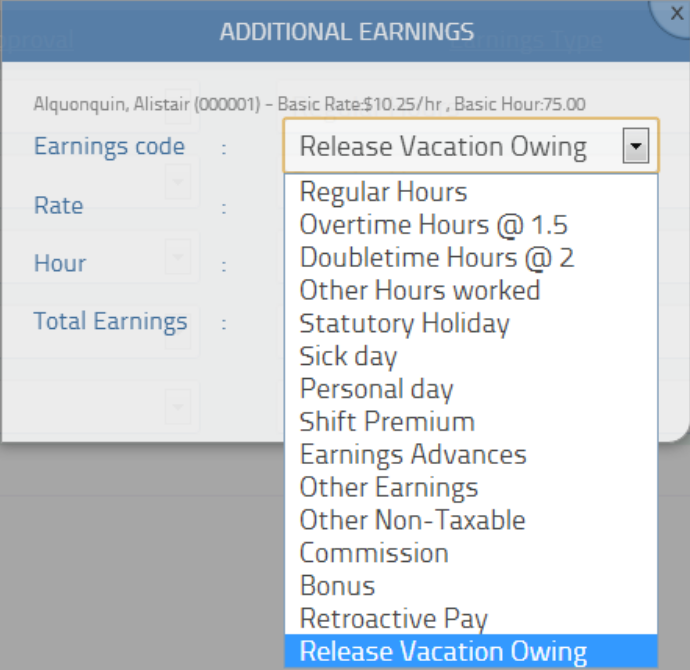
- Any existing vacation pay accrued for the employee will be shown in the total field. You can override that amount and enter a partial amount (ie less than the amount shown) or even an amount greater than what they have accrued (which will create a negative vacation balance).
- If you need to release all accrued vacation (including any vacation that will be accumulated on this particular run), check the box "Release all vacation pay including current earnings"

Some notes to keep in mind:
- Ensure your employee is set for automatic vacation tracking
- In the release vacation pay box, choosing the default amount will release any accrued vacation up until the payrun you are performing. This will not release vacation accrued in the new / current payrun.
- Entering an amount less than the vacation balance of the employee will perform a "partial release" and deduct that amount from their overall vacation balance.
- Entering an amount greater than the employee's vacation balance will deplete all vacation balances and create a negative entry as their vacation balance. This may be useful if you are allowing your employee to take vacation up front before accruing it. Future accruals of vacation will adjust the negative amount accordingly.
- The vacation amount will only be shown AFTER the calculation step - specifically on the REVIEW step.
-

Based on these CRA's guidelines: http://www.cra-arc.gc.ca/tx/bsnss/tpcs/pyrll/clcltng/spcl/vctn-eng.html I am supposed to remit deductions for CPP and EI on Vacation Hours taken. The above proposed method does not work, as my employee's hours are not included in this and therefore their deductions are incorrect. What do you suggest?
-
@Rick Johnston: If you use the automatic vacation tracking feature, vacation payments ARE subject to the standard source deduction rules (including EI, CPP and taxes). Please remember that vacation is tracked as a monetary value (not hours) and source deductions are made based on the monetary value of vacation paid out.
Post is closed for comments.
Comments
2 comments